
Why your app slows down with users
It is not the AIs fault. You asked for a beautiful working app, and that is what you got. Optimizing queries, indexing tables and preparing for growth is something you never asked for. These 8 scalability prompts ask for it now, inside your project, so the AI reads your real code.
The 3 silent problems
1. You fetch data nobody asked for
You open the orders screen and the app fetches all 5,000, when 20 fit on screen. With 50 you never notice. With 5,000 the screen lags, the phone stutters and your database bill climbs. The fix is pagination: fetch 20 at a time, load more on scroll.
2. One query per row
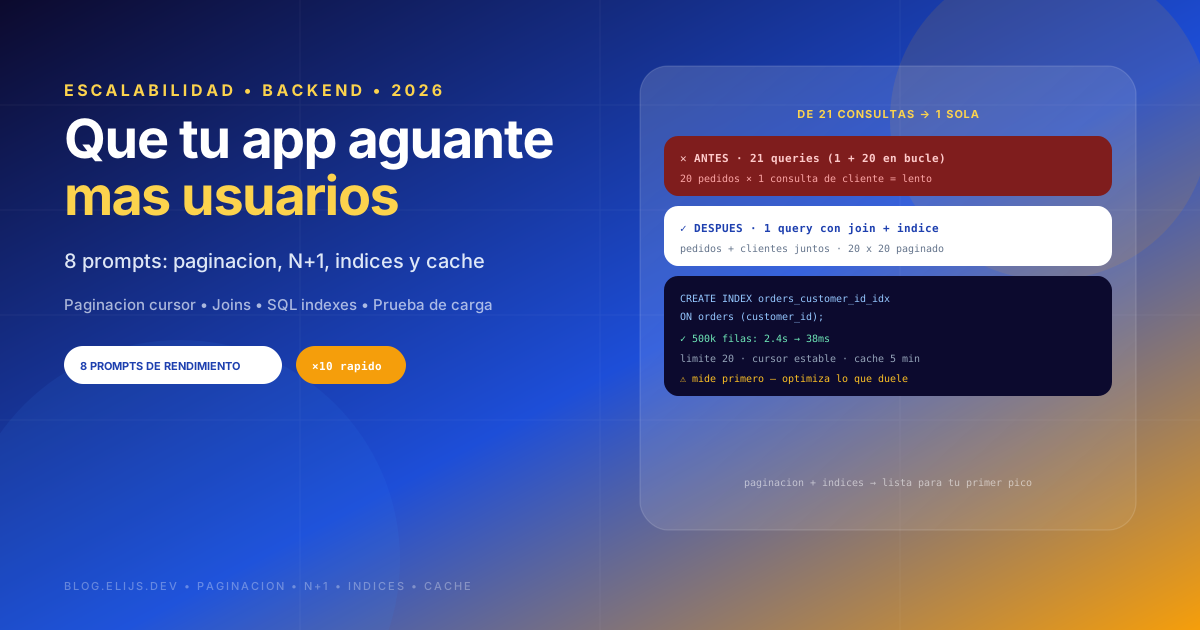
You fetch 20 orders, then one extra query per order for its customer. That is 21 queries for one screen. With 100 orders it is 101. This is called the N+1 problem, fixed by fetching orders plus customers together in a single query.
3. Tables without indexes
You filter by customer id, but that column has no index. The database scans the whole table, row by row, every time. With 1,000 rows you never notice. With 500,000 you do. An index is like a book index: instead of reading everything, it jumps straight to what you need.
Before touching anything, measure. The part you think is slow is almost never the actually slow one, and every index makes writes slightly slower. Optimize what hurts, not everything.
How to use these prompts
Run one prompt at a time, in order. Start with the first, telling you where your app will fall over, and fix in that order. Never optimize blind: measure first, change second.
1. Where will my app fall over
js
Act as a backend engineer experienced in fast-growing apps. Tell me
which parts will get slow or fail with many users and lots of data.

Here is what I have:
[PASTE HERE your main screens and queries, or open this prompt in
your project. Tell me your database: Supabase, Firebase, Postgres,
MySQL, etc.]

Review:
1. Queries fetching all rows with no limit or pagination
2. Queries inside loops: one per list item (N+1 problem)
3. Filtered, sorted or joined columns probably missing an index
4. Queries fetching all columns while using two or three
5. Data re-fetched on every load although it rarely changes
6. Full-size images shown small

Answer like this:
- The 5 most severe problems, by pain while growing
- For each: file and line, what happens with 100 users and
  with 10,000
- What to fix first and why

No code changes yet, diagnosis only.
2. Pagination
js
Act as a backend engineer fixing a screen that fetches too much
data. Add pagination to this screen.

Here is what I have:
[PASTE HERE the screen and query code]

Do this:
1. Tell me how many records it fetches today and why it is a problem
2. Implement 20-by-20 pagination, my databases recommended way
3. Explain page vs cursor pagination, and which fits here
4. Update the UI: load-more button or infinite scroll, with loading
5. Stable ordering, so rows never repeat or skip on load-more

Give me the complete final code and how to test it with many rows.
js
// Example: cursor pagination on Supabase, no repeated rows
const PAGE_SIZE = 20;

async function getOrdersPage(cursorCreatedAt = null) {
  let query = supabase
    .from('orders')
    .select('id, total, created_at, customer:customers(id, name)')
    .order('created_at', { ascending: false })
    .limit(PAGE_SIZE);

  if (cursorCreatedAt) query = query.lt('created_at', cursorCreatedAt);
  const { data, error } = await query;
  if (error) throw error;
  const nextCursor = data.length === PAGE_SIZE
    ? data[data.length - 1].created_at
    : null;
  return { orders: data, nextCursor }; // null = no more
}
3. N+1 problem
js
Act as a backend engineer hunting unnecessary queries.
Find and fix where I run one query per list row.

Here is what I have:
[PASTE HERE the screen or endpoint showing a list with related
data, like orders with their customer]

Do this:
1. Count todays queries with 20 items and with 200
2. Point at the query sitting inside the loop
3. Rewrite it as a single query, with joins or relations syntax
4. If a single one is impossible, batch them into few fixed queries
5. Tell me how many queries remain after the change

Show me before and after, and confirm users see the same result.
4. Database indexes
js
Act as a database administrator reviewing a project about to grow.
Tell me which indexes are missing.

Here is what I have:
[PASTE HERE your table schemas and most-run queries, with which
columns you filter, sort and join by]

Do this:
1. For each query, which columns need an index and why
2. The SQL creating them, ready to run
3. Which should be composite, and column order
4. Whether any proposed index slows writes and if it is worth it
5. Whether unused indexes only get in the way
6. How to confirm the database really uses each index

Important: test environment first, not production. Tell me how to
create indexes without locking the table if I already have users.
js
-- Typical example: filtering and sorting orders by customer and date
CREATE INDEX CONCURRENTLY orders_customer_created_idx
  ON orders (customer_id, created_at DESC);

-- Confirm usage (Postgres / Supabase)
EXPLAIN ANALYZE
SELECT id, total FROM orders
WHERE customer_id = 'abc' ORDER BY created_at DESC LIMIT 20;
5. Fetching only what you need
js
Act as a performance engineer reviewing how much data travels.
Reduce what each screen transfers.

Here is what I have:
[PASTE HERE your queries and the screens using them]

Review:
1. Queries fetching all columns while screens use a few
2. Heavy fields fetched needlessly: long texts, big JSON,
   base64 images
3. List data only needed in the detail view
4. Full images shown small
5. Data users never even see

For each case tell me todays transfer size, what to cut, and the
fixed query.
6. Caching what rarely changes
js
Act as a performance engineer deciding what is worth caching.
Stop my app from re-fetching the same thing forever.

Here is what I have:
[PASTE HERE your main screens code and your stack]

Do this:
1. Split rarely-changing data (categories, settings, profiles)
   from fresh data (balances, orders, stock)
2. For each, where to cache and for how long
3. Implement it with my projects tools
4. How cache clears when data changes, so nobody sees stale info
5. What I should NEVER cache in my case and why

Give me the final code and how to verify caching works.
7. Measuring what is actually slow
js
Act as a performance engineer who measures, never guesses.
Teach me what is slow in my app.

Here is what I have:
[PASTE HERE your stack and database, and describe the slow screen]

Do this:
1. How to see each query time, with the exact command
   (how to read a query execution plan)
2. Interpret it in plain words: full table scan vs index usage
3. How to measure a screen load time
4. One free tool to watch this in production and how to wire it
5. Three numbers to watch weekly, with a sane value each

Explain it for someone who never measured performance.
8. Load-testing before you have the load
js
Act as a QA engineer preparing a load test.
Help me learn how many users my app survives.

Here is what I have:
[PASTE HERE your main flow and hosting: Vercel, Supabase, etc.]

Do this:
1. How much seed data makes sense (e.g. 100,000 rows) plus script
2. One simple load-test tool, with ready-to-run config
3. Ramp users up and what to watch at each level
4. Which current-plan limits I can hit: connections, timeouts,
   request caps
5. How to read results: what failing at some point means

Important: test environment with fake data, never production or
real user data.